Configuration
Setup
When you add the integration, it asks for two things:
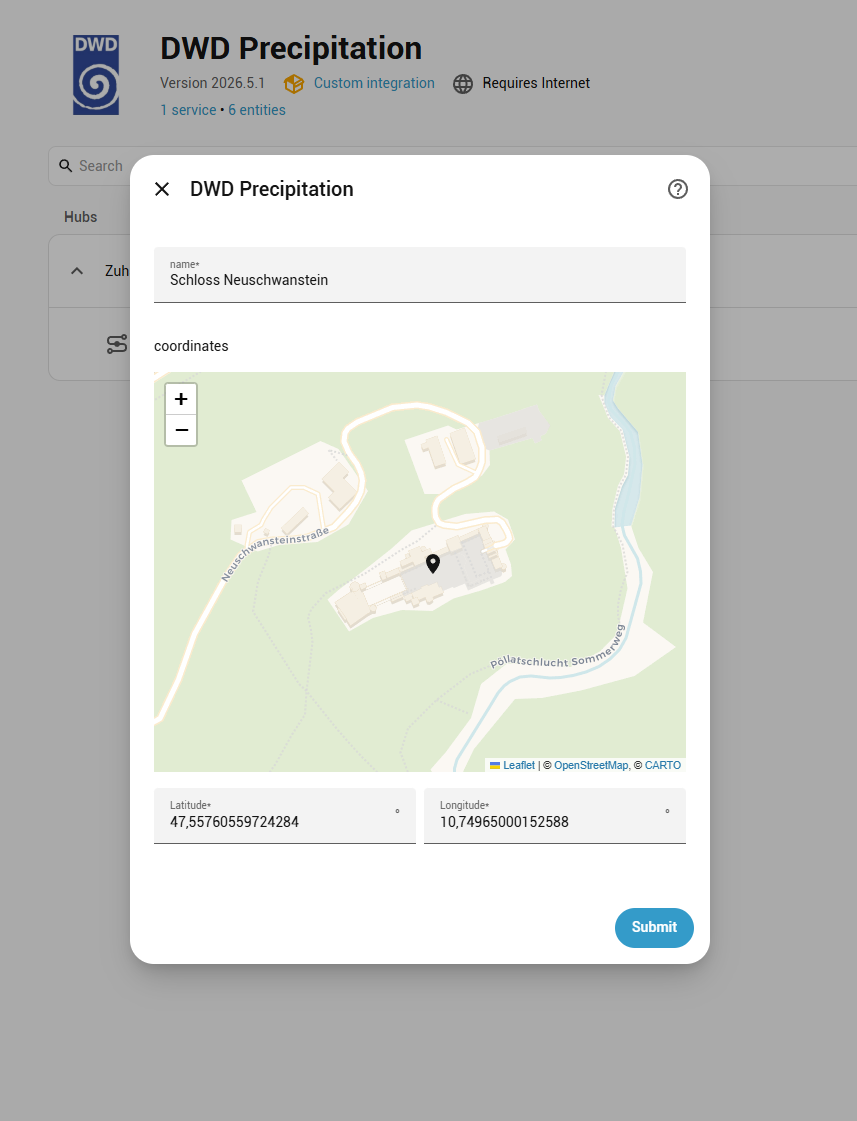
- Name: used for the device and as the prefix of every entity id. It
defaults to the name of your Home Assistant location. With the name
Home, the entities aresensor.home_precipitation_last_60_minand so on. - Location: the point to report precipitation for. It defaults to your Home Assistant home location. The sensors report the radar grid cell containing this point, about 1 km across.
A location clearly outside Germany is rejected right away. One near the edge of the radar coverage is accepted, and if a product turns out not to cover it, the log says so when that product is read. See Grid cell lookup.
Several locations
Add the integration once per location, for example for your home and your holiday flat. Every entry gets its own device and its own set of entities, so each needs a different name.
To move an existing entry to another location, delete it and add it again.
Rain warnings
A location can have rain warnings of its own, such as "Laundry, 60 minutes ahead". Add one with Add rain warning on the location's entry in Settings > Devices & services > DWD Precipitation. Each warning is a device with an on/off and a status entity; see Rain warnings.
Options
Open Settings > Devices & services > DWD Precipitation > Configure. The form has one section for each group of sensors, and every setting's help text links to its description on this page. Saving reloads the integration; the sensors are back after a few seconds.
None of the settings change how often data is fetched: each product is fetched as soon as DWD publishes it, and a failed download is retried automatically.
| Section | Setting | Default |
|---|---|---|
| Rain forecast | Only count rain heavier than | 0 mm/h |
| Show start and end as | clock time | |
| "Precipitation end" shows | the first dry break | |
| Timespan without precipitation | Rain that resets the count | 1.0 mm |
| Measured with | radar and rain gauges (RW) | |
| Rain events and rain warnings | Add the "Rain events" sensor | off |
| Only count rain heavier than | 0.1 mm/h | |
| Advanced | Add technical details to the sensors | off |
| Add the past hour to the hourly rain series | off | |
| Show "unavailable" when the data is out of date | on |
Rain forecast
Settings for Precipitation start, Precipitation end and
Precipitation expected. The other sensors always report what DWD reports,
whatever you set here.
Only count rain heavier than
Rain lighter than this, in mm per hour, counts as dry for the three sensors.
0 (the default) counts any rain the radar sees; around 0.5 ignores
drizzle.
Show start and end as
- Clock time (default): the sensors show a time, for example
14:25. - Minutes from now: the sensors show how many minutes are left, for
example
20.
Whichever you do not pick is still there as an attribute of the same sensor
(at or minutes_until).
"Precipitation end" shows
- The first dry break (default): when the current shower stops. In showery weather this moves around, because the next shower is not counted.
- When no more rain is forecast: when the forecast shows no further rain
at all. It changes less often, but stays
unknownfor longer.
DWD's forecast reaches only two hours ahead, so if the rain lasts longer than
that, the sensor is unknown either way.
Timespan without precipitation
Settings for Timespan without precipitation,
the sensor that counts how long it has not rained.
Rain that resets the count
When at least this much rain falls within one hour, the count starts again
from zero. The default is 1.0 mm; 1 mm is 1 litre of water per square
metre. It is an amount within the hour, not a rate.
Measured with
Which measurement of the past hour's rain is compared with that amount:
- Radar and rain gauges (RW), the default for new installs: DWD checks the radar against rain gauges on the ground, which makes it more accurate. DWD recalculates this every 10 minutes, so a reset shows about 30 to 40 minutes after the rain.
- Radar only (RS): updated every 5 minutes, so it reacts faster, but it is less exact.
Both look at the last 60 minutes, so with either one the count keeps starting again for up to an hour after the rain has stopped, until the rain has left that hour.
Installs set up before this setting existed keep Radar only, so upgrading changes nothing; switch here if you prefer the other one. The count keeps its value when you switch.
Rain events and rain warnings
Rain events follow each shower from the first forecast that shows it until
it has passed. Rain warnings are built on
them; you add those with Add rain warning on the integration's page (see
Rain warnings above). The section is open when the
Rain events sensor is on or the location has a rain warning, and collapsed
otherwise.
Add the "Rain events" sensor
Adds the Rain events sensor, for blueprints
that warn about or report rain. Off by default. Rain warnings work without
it.
While the sensor is on, or the location has a rain warning, the integration also downloads the parts of the radar data it missed (for example while Home Assistant was restarting) and keeps a small record of recent rain on disk. Turning the sensor off removes it; the record is deleted once no rain warning needs it either, so turning it on again then starts fresh.
Only count rain heavier than
Rain lighter than this, in mm per hour, does not count towards a rain event,
for the Rain events sensor and all rain warnings. 0 counts any rain the
radar sees; the default is 0.1. This is separate from the setting of the
same name under Rain forecast, so the two can
disagree if you set them differently.
Advanced
Extra details for templates and charts, and what the sensors show when DWD is late. The section is collapsed; most installations never change it.
Add technical details to the sensors
Shows which DWD product each value comes from, when it was measured and which period it covers, as extra attributes of the sensors. Helpful in templates or when you report a problem; otherwise leave it off. Attributes lists them.
Add the past hour to the hourly rain series
For charts: the forecast_rolling_1h attribute of
Peak hourly precipitation next 120 min then starts one hour earlier. Its
first entries include rain that has already fallen, so a chart shows the past
hour and the forecast as one curve. The sensor's value does not change.
The past hour is worked out from radar data the integration has already downloaded, so it costs no extra download. After a restart, or when DWD was late with a 5-minute update, it appears once the integration has seen a full hour of updates again. See RADVOR RV nowcast.
Show "unavailable" when the data is out of date
If DWD is late with new data, the affected sensors show unavailable
instead of an old value. Turn it off to keep showing the last value, even if
it is hours old. Either way, the missing data keeps being downloaded in the
background. Availability and staleness
explains how late is too late.